Client platforms
Aramco AI Call Center
An AI call centre for Aramco — it answers, works out the fault, and raises the service request itself.
Try the product
See Aramco AI Call Center at work
AI call centre · live simulation
A fault is reported by phone
The agent takes the call and gathers exactly what an Archibus work request needs, in the order a coordinator would ask for it.
What the system is doing
- Caller
- 2Agent
- 3Caller
Archibus work request · drafted while the caller talks
WR-48812 · Requested
- Location
- BL-12 · Floor 2 · Plant room
- Equipment
- CH-12-02
- Problem type
- listening…
- Priority
- listening…
The chiller on level 2 of building 12 has stopped. The labs are already warming up.
/v1/calls/work-requests/context
Data gathered · 84ms
/v1/calls/work-requests
Queued
/v1/calls/work-requests/record
Queued
Interactive reconstruction · simulated API activity and representative data, not a live production system
Operations dashboard
Monitor Aramco AI Call Center
Web-focused · filter, inspect and sync
Web control center
Call centre operations
Activity trend
Live activity
/v1/calls/work-requests/context
Data gathered · 84ms
/v1/calls/work-requests
Workflow processed · 121ms
/v1/calls/work-requests/record
Record updated · 158ms
Playable dashboard · tap metrics, change the period or sync connected data
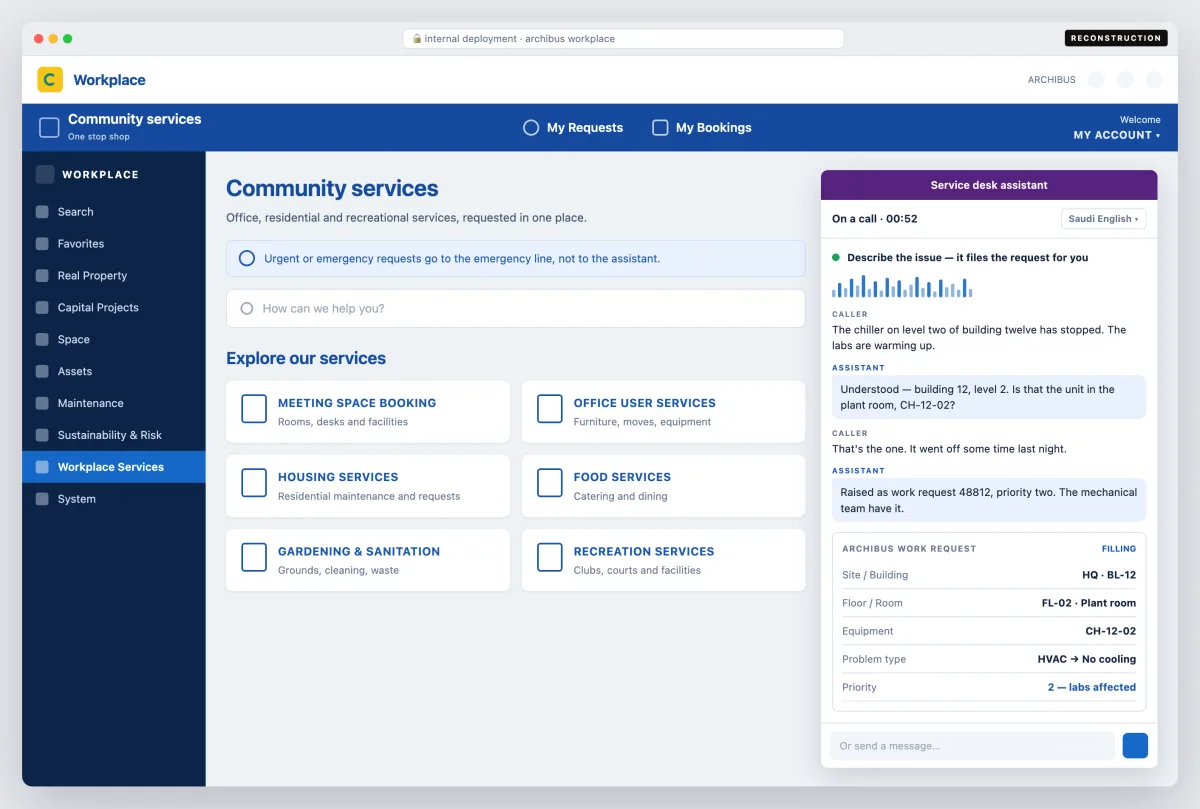
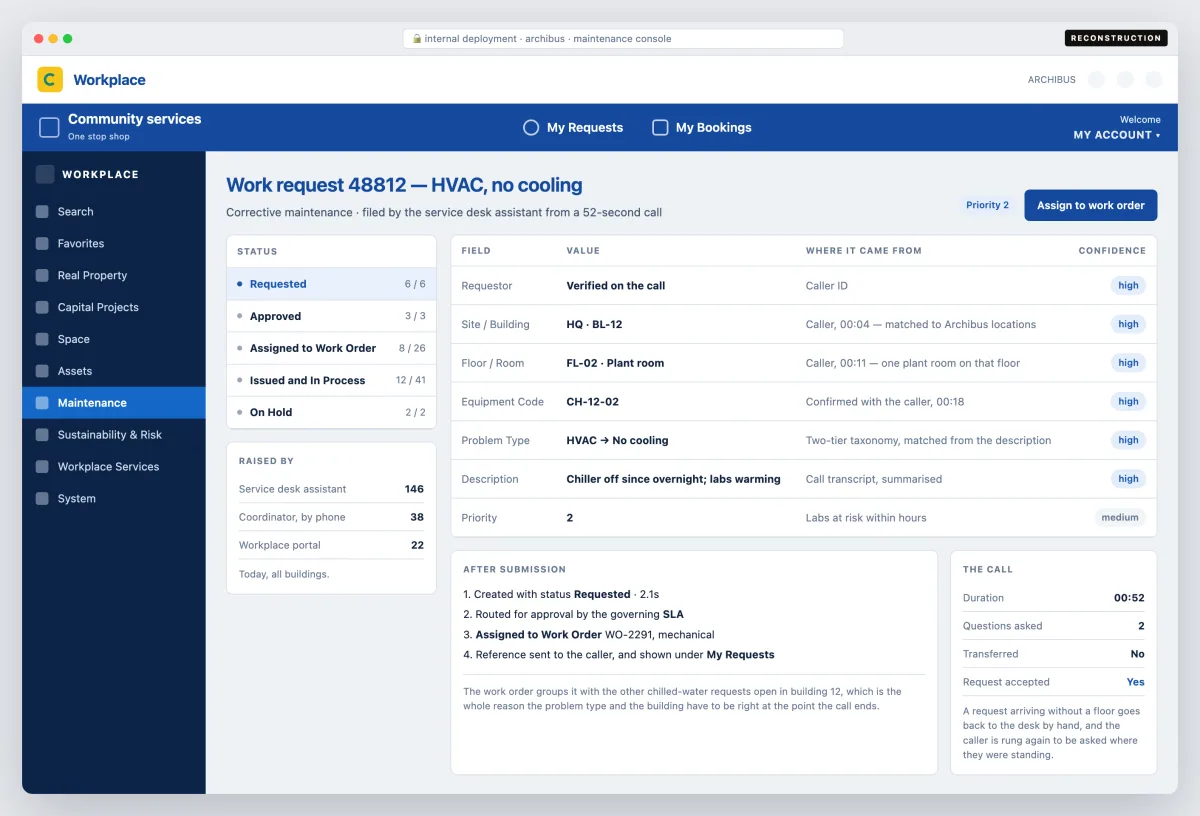
Enterprise client work — there is no public site to link and no screenshot that can be published, so the interface here is a reconstruction rather than a capture.
The phone is the front door of a community services operation — office, residential and recreational services, from a broken chiller to a room booking, all asked for at one desk. Somebody reports it, a coordinator writes it down, and a request is keyed into the system that dispatches the work. This automates the writing-down and the keying-in: the assistant answers, establishes what is wrong and where, asks the questions a coordinator would ask, and raises the request itself before the caller hangs up.
It answers the phone, and it is also docked in the Archibus Workplace portal the services are requested through — describe the issue and it files the request for you, in speech or in text, in the language the caller picks. Urgent and emergency calls are the exception and go to the emergency line, never to the assistant.
The request is raised in Archibus, which decides the shape of the whole conversation. Archibus does not want a paragraph; it wants a requestor, a location down to site, building, floor and room or a specific equipment code, a problem type from its two-tier taxonomy, a description and a priority — and it routes, approves and escalates what it gets according to the governing SLA. So the agent is built backwards from that record: it keeps asking until the work request will pass, rather than hanging up with a transcript nobody can action.
Getting the fields right is what makes the difference between a request and a phone call somebody has to make again. A work request that arrives with the wrong problem type or a building but no floor goes back to the desk to be fixed by hand, and the caller is rung back to be asked where they were standing — so the agent matches the location against the site data and the problem against the taxonomy while the caller is still talking, and reads the reference back at the end.
A person is still the escape hatch. Anything urgent, ambiguous or outside what the agent is allowed to raise is routed to the human desk with the transcript and the half-filled request attached, so the caller does not start again from the beginning.
What it looked like
How it worked
- Service requests raised directly in Archibus, not emailed to a desk
- Answers on the phone and inside the Archibus Workplace portal
- Location captured as site, building, floor and room, or an equipment code
- Problem type matched to the Archibus two-tier taxonomy on the call
- Routing, approval and escalation left to the governing SLA